
How MTConnect Organizes Machine Data: A Developer’s Guide to Device Files

In MTConnect, machine data is not just a stream of numbers and signals. For applications to understand that data, they also need to know how the machine itself is structured.
A typical manufacturing machine contains many subsystems like controllers, axes, spindles, coolant systems, and more. Each of these components produces different types of data, and without context it can be difficult for software systems to interpret those signals correctly.
This is where MTConnect device files come in. A device file acts as a blueprint that describes the logical structure of a machine, including its components and the data they produce. It also defines how raw machine signals are mapped into standardized MTConnect data.
In this article, we’ll explore how MTConnect device files organize machine data using components and data items, and why they are essential for building reliable manufacturing applications.
From Machine Signals to Structured Data
Machines typically generate raw signals through proprietary controllers or sensors. These signals are first collected by an adapter. The adapter forwards the data to an MTConnect Agent, which then exposes the standardized information to client applications.
Machine Controller / Sensors
↓
Adapter
↓
MTConnect Agent
↓
Applications (Dashboards, MES, Analytics)
The challenge is that raw machine signals often use vendor-specific tag names or formats. The device file solves this by mapping those raw signals into the MTConnect vocabulary.
For example, a machine might output a sensor tag like X1234_TEMP. The device file defines how that signal should be interpreted and represented as a standardized MTConnect data item such as Temperature.
In other words, the device file acts as the translation layer between machine signals and standardized machine data.
What is a Device File?
A device file describes the structure of the machine being monitored. It defines the devices, components, and data items that make up the machine model.
You can think of it as a digital blueprint of the machine’s data structure.
The device file provides metadata about:
The machine itself
Its internal components
The data signals produced by those components
This information is returned when an application queries the MTConnect Agent using the Probe endpoint.
Developers typically store this information because it represents the exact structure of the machine at a given time, including the version of the standard being used and the configuration of the monitored device.
Once an application understands this structure, it can interpret incoming machine data correctly.
Understanding the MTConnect Machine Hierarchy
MTConnect models machines using a hierarchical structure. At the highest level is the device, which represents the entire machine. Inside that device are components, and inside components are data items.
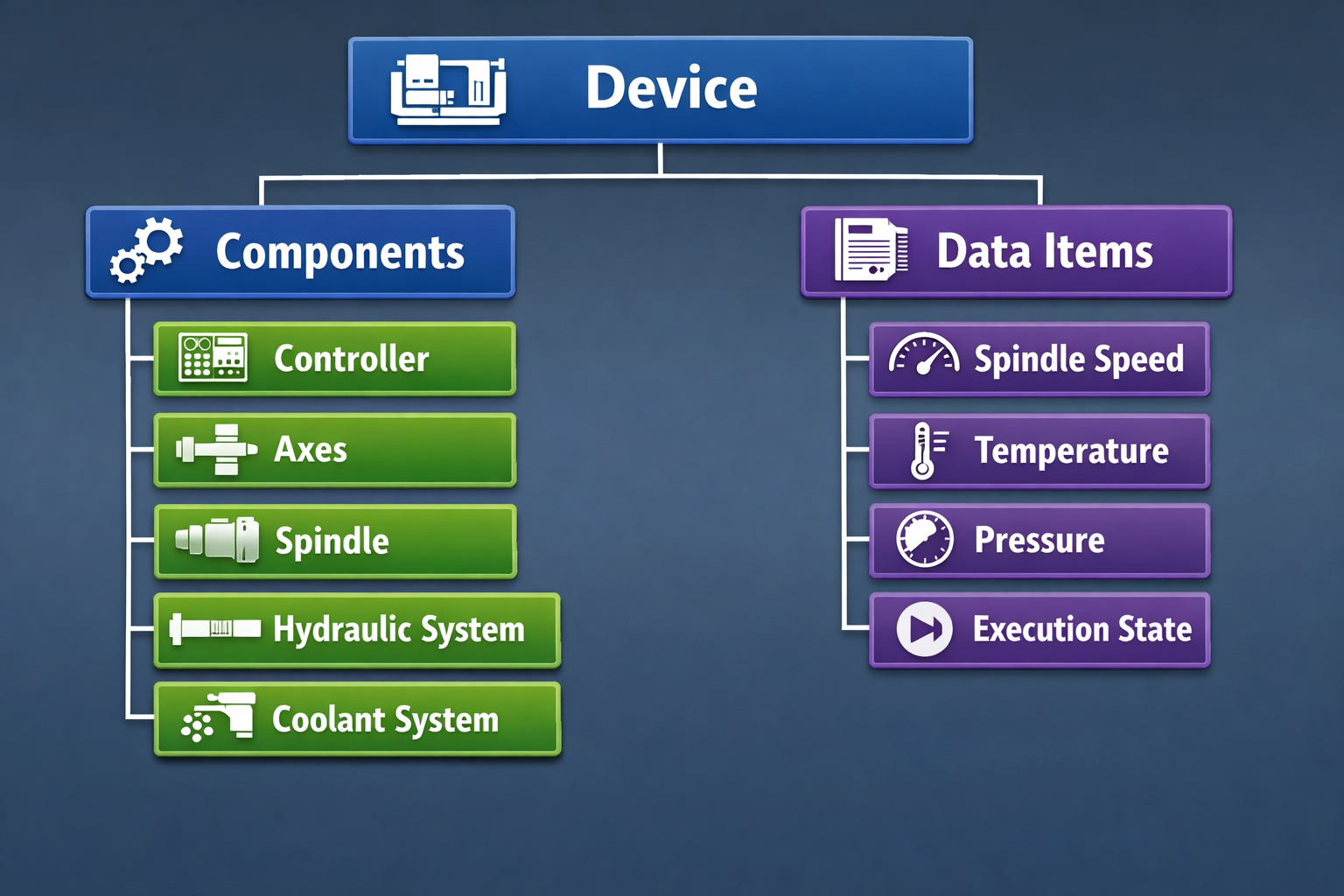
This hierarchical design mirrors how machines are physically structured. It allows applications to understand not just what data exists, but where that data belongs within the machine.
For example, hydraulic pressure measurements would belong under the hydraulic system component, while spindle speed would belong under the spindle component.
This contextual organization makes machine data easier to interpret and easier to use in software systems.
Components: The Building Blocks of a Machine Model
Components represent the subsystems inside a machine. These components act as containers for the data items related to each subsystem.
In a typical CNC machine, components may include:
Controller systems
Axes and tool paths
Electrical and hydraulic systems
Auxiliary systems such as chip disposal or environmental sensors
Each component organizes related machine signals together. For example, the hydraulic component may include pressure, temperature, and vibration readings from the hydraulic motor.
MTConnect also allows deeper hierarchies. For instance, the controller component can contain paths that represent independent machine heads or turrets. This allows systems to monitor machines with multiple independent control paths.
The result is a structured model that accurately reflects the internal architecture of the machine.
Data Items: The Actual Machine Signals
While components represent machine structure, data items represent the actual signals coming from the machine.
A data item is essentially a tag that describes a specific piece of machine information. When defining a data item, developers specify attributes such as the type of signal, its units, and other metadata.
For example, a temperature data item might define:
The signal type (temperature)
The measurement units (Celsius)
A unique identifier within the device file
Each data item must include a unique ID and a defined type, ensuring that applications can interpret the data consistently across machines.
One special data item that every MTConnect implementation must include is Availability. This indicates whether the machine is currently active and capable of providing valid data. If availability is reported as unavailable, applications should treat other machine signals as stale or invalid.
The Three Types of MTConnect Data
MTConnect classifies machine signals into three categories based on the type of information they represent.
Samples
Samples represent continuously changing numerical measurements. These are typically analog values collected from sensors.
Examples include:
Temperature
Spindle speed
Pressure
Axis position
Events
Events represent machine states or discrete changes. These values often come from a predefined vocabulary.
Examples include:
Execution state (READY, ACTIVE, STOPPED)
Machine mode
Program state
Conditions
Conditions describe machine health and diagnostic information. These signals typically represent alarms or warnings related to machine operation.
Examples include:
System alarms
PLC faults
Program errors
Conditions are especially useful for advanced diagnostics because they provide context about the health of machine components.
How Device Files Map Machine Signals
When data arrives from an adapter, it usually appears as simple key-value pairs. The device file determines how those signals should be interpreted and mapped to MTConnect data items.
Machine Sensor Data
(Vendor Tags)
↓
Adapter
↓
Device File Mapping
↓
MTConnect Data Items
↓
Applications
For example, a coolant pressure sensor may send a value in PSI. The device file can define that the native unit is PSI but the MTConnect representation should use Pascal. The Agent then performs the unit conversion automatically before exposing the data to applications.
This mapping process ensures that applications always receive standardized and consistent data, regardless of how the original machine reported the signal.
Supporting Multiple Data Sources
In many manufacturing environments, machines may not expose every sensor through the original controller. MTConnect allows developers to add additional sensors and data sources.
For example, if a machine vendor does not expose coolant pressure data, a third-party sensor can be installed. That sensor might publish data through MQTT, which can then be connected to the MTConnect Agent and mapped into the device model.
Once configured in the device file, the new data appears as if it were part of the original machine data stream.
This flexibility allows factories to extend machine monitoring without modifying the machine controller itself.
Conclusion
Machine data becomes far more valuable when it is structured and contextualized. MTConnect achieves this by modeling machines through device files that define their components and data items.
Device files describe the structure of the machine. Components represent subsystems within the machine. Data items represent the signals generated by those subsystems.
Together, these elements create a clear and consistent model for machine data.
For manufacturing developers and software engineers, this structure simplifies integration, enables interoperability across different machines, and provides the foundation for advanced applications such as production monitoring, predictive maintenance, and digital twins.
Understanding device files is an important step toward building scalable smart manufacturing systems powered by standardized machine data.
For a deeper walkthrough of the concepts and architecture discussed here, you can also watch Session 3 of the MTConnect Bootcamp: